Prerequisites
Introduction to Graphs
Strong and Weak Ties
Outcomes
Know what a weighted graph is and how to construct them using
SimpleWeightedGraphs.jlImplement the shortest path algorithm for traversing a weighted graph
References
Easley and Kleinberg chapter 5 (especially section 5.1-5-3)
# import Pkg; Pkg.add("SimpleWeightedGraphs")using Graphs, GraphPlot, SimpleWeightedGraphsIntroduction
So far we have considered a few types of graphs
Undirected graph: nodes and are connected by an edge
Directed graph: connection from node to node
Strong/weak graphs: each edge is labeled as strong or weak
Today we extend our understanding of networks to talk about weighted graphs
Each edge is assigned a
floatdenoting the strength of tieTies can be positive (friends) or negative (enemies)
Can also very in strength (+2.0 better friends than +0.2)
Weighted Adjacency Matrix
In a simple (unweighted) graph, we used a matrix of 0’s and 1’s as an adjacency matrix
A 1 in row i column j marked an edge between i and j (or from i->j for directed)
A 0 marked lack of an edge
G1 = complete_graph(4)
locs_x = [1, 2, 3, 2.0]
locs_y = [1.0, 0.7, 1, 0]
labels1 = collect('A':'Z')[1:nv(G1)]
gplot(G1, locs_x, locs_y, nodelabel=labels1)A1 = adjacency_matrix(G1)4×4 SparseArrays.SparseMatrixCSC{Int64, Int64} with 12 stored entries:
⋅ 1 1 1
1 ⋅ 1 1
1 1 ⋅ 1
1 1 1 ⋅We can extend idea of adjacency matrix to include weighted edges
Suppose nodes A, B, C are friends -- but A-C are best friends
Also suppose that all of A, B, C consider D an enemy
To represent this we might say weight of edges is:
A-BandB-C: 1.0A-C: 2.0A-D,B-D,C-D: -1.0
Here’s the adjacency matrix
A2 = [0 1 2 -1; 1 0 1 -1; 2 1 0 -1; -1 -1 -1.0 0]4×4 Matrix{Float64}:
0.0 1.0 2.0 -1.0
1.0 0.0 1.0 -1.0
2.0 1.0 0.0 -1.0
-1.0 -1.0 -1.0 0.0And here is how we might visualize this graph (notice the labeled edges)
G2 = SimpleWeightedGraph(A2)
gplot(
    G2, locs_x, locs_y,
    nodelabel=labels1, edgelabel=weight.(edges(G2)),
)Shortest Paths
Before we compare paths, let’s check what the weights mean.
In our friendship example, a larger positive weight meant a stronger tie. For travel, we will use weights as costs and look for a route with the smallest total.
Question: would we want a larger friendship weight? What about a larger travel cost?
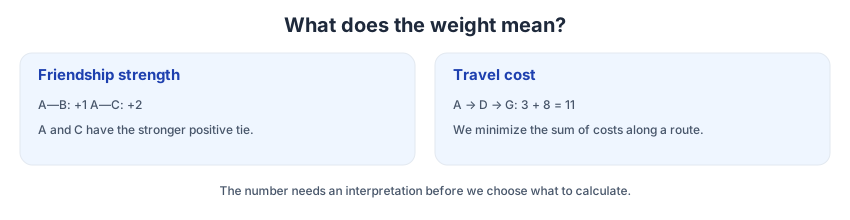
Figure 1:The meaning of an edge weight determines how we use it.
Figure 1 marks the change in interpretation. The path example below uses positive travel costs.
We talked previously about shortest paths for a Graph
This was defined as the minimum number of edges needed to move from node n1 to node n2
When we have a weighted graph things get more interesting...
Let represent the weight connecting nodes and
Define the shortest path between n1 and n2 as the path that minimizes for all edges
A->Balong a path
Example
Consider the following directed graph
A3 = [
    0 1 5 3 0 0 0
    0 0 0 9 6 0 0
    0 0 0 0 0 2 0
    0 0 0 0 0 4 8
    0 0 0 0 0 0 4
    0 0 0 0 0 0 1
    0 0 0 0 0 0 0
]
G3 = SimpleWeightedDiGraph(A3)

#plotting details
locs_x_3 = [3, 5, 1, 3, 4, 2, 3.0]
locs_y_3 = [1, 2, 2, 3, 4, 4, 5.0]
labels3 = collect('A':'Z')[1:size(A3, 1)]
gplot(G3, locs_x_3, locs_y_3, nodelabel=labels3, edgelabel=weight.(edges(G3)))We wish to travel from node A to node G at minimum cost
The shortest path (ignoring weights) is A-D-G
Taking into account weights we have 3 + 8 = 11
There are two other paths that lead to lower cost (total of 8)
A-C-F-Ghas cost 5 + 2 + 1 = 8A-D-F-Ghas cost 3 + 4 + 1 = 8
For this small graph, we could find these paths by hand
For a larger one, we will need an algorithm...
Which route uses fewer edges? Which costs less? Compare the highlighted routes in Figure 2.
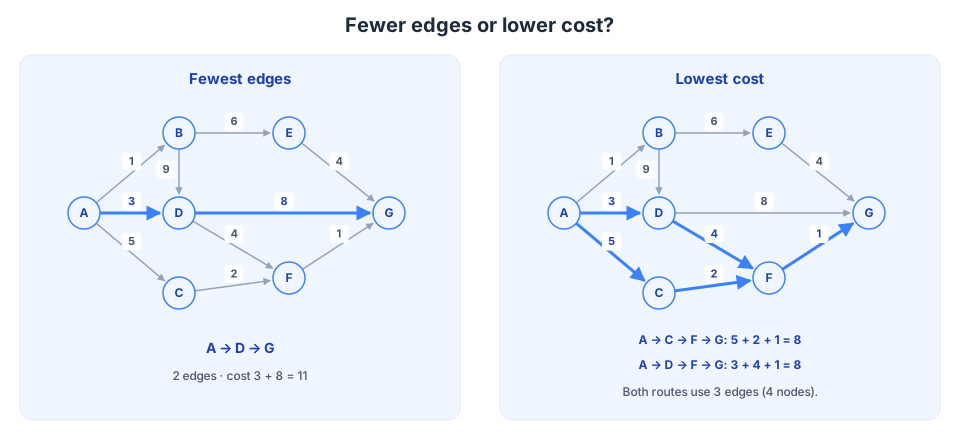
Figure 2:The route with the fewest edges costs 11. Two routes with one extra edge tie at a cost of 8.
Shortest path algorithm
Let be the minimum cost-to-go from node to node G
Suppose that we know for each node , as shown below for our example graph
Note
Leaving A for B costs only 1. Should we go that way? Let’s include the rest of the trip.
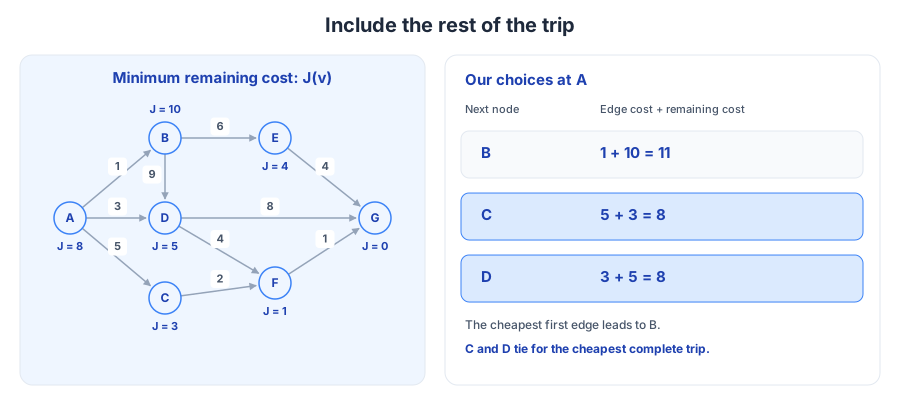
Figure 3:Add the cost of the next edge to the minimum remaining cost. At A, C and D are both optimal choices.
Figure 3 shows why the cheapest next edge need not give the cheapest complete trip.
With in hand, the following algorithm will find the cost-minimizing path from to :
Start with
From current node move to any node that solves , where is the set of nodes that can be reached from .
Update notation to set
Repeat steps 2-3 (making note of which we visit) until
Exercise: Traversing Cost-Minimizing Path
Let’s implement the algorithm above
Below I have started a function called
traverse_graphYour task is to complete it until you get that the minimum cost path has a cost of 8 and contains 4 nodes (3 edges)
J3 = [8, 10, 3, 5, 4, 1, 0]7-element Vector{Int64}:
8
10
3
5
4
1
0function traverse_graph(
G::SimpleWeightedDiGraph,
J::AbstractArray,
start_node::Int, end_node::Int
)
path = Int[start_node]
cost = 0.0
W = weights(G)
# TODO: step1, initialize v
v = 1 # CHANGE ME
num = 0
while v != end_node && num < nv(G) # prevent infinite loop
num +=1
F_v = neighbors(G, v)
# TODO: step 2, compute costs for all n in F_v
costs = [0 for n in F_v] # CHANGE ME
n = F_v[argmin(costs)]
# TODO: how should we update cost?
cost += 0 # CHANGE ME
push!(path, n)
# TODO: step 3 -- update v
v = v # CHANGE ME
end
path, cost
endtraverse_graph (generic function with 1 method)traverse_graph(G3, J3, 1, 7)([1, 2, 2, 2, 2, 2, 2, 2], 0.0)But what about 
The shortest path algorithm we presented above sounds simple, but assumed we know
How can we find it?
If you stare at the following equation long enough, you’ll be convinced that satisfies
This is known as the Bellman equation
It is a restriction that must satisfy
We’ll use this restriction to compute
Computing J: Guess and Iterate
We’ll present the standard algorithm for computing
This is an iterative method
Let represent the iteration we are on and be the guess for on iteration
Algorithm
Set , and
Keep . For every other node , set , using the previous round’s values for every update.
Check if and are equal for all -- if not set and repeat steps 2-3
For this directed acyclic graph, every node can reach G, and these updates converge to .
We start with every guess equal to zero. What do you think will be after one update? What about two?
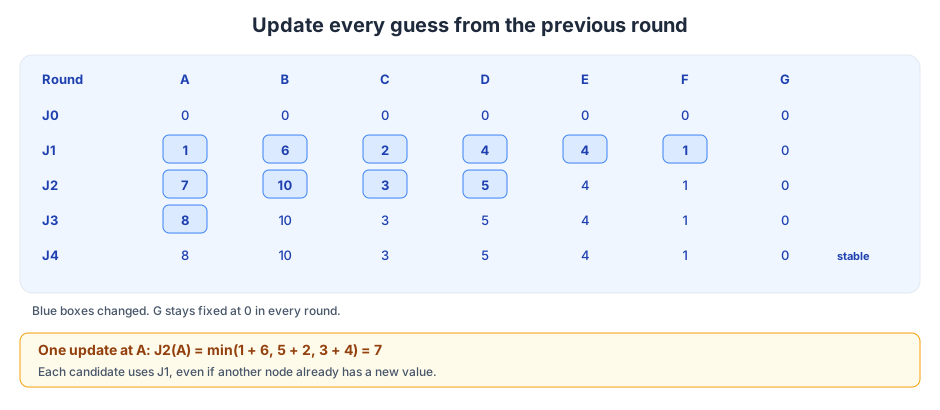
Figure 4:Each round uses only the previous round’s values. The fourth update confirms that the third round is unchanged.
In Figure 4, uses the values from . It does not use a neighbor’s newly computed value from the same round.
Implementation
Let’s now implement the algorithm!
We’ll walk you through our implementation
cost(W, J, n, v) = W[v, n] + J[n]cost (generic function with 1 method)function compute_J(G::SimpleWeightedDiGraph, dest_node::Int)
N = nv(G)
# step 1. start with zeros
i = 0
Ji = zeros(N)
next_J = zeros(N)
W = weights(G)
done = false
while !done
i += 1
for v in 1:N
if v == dest_node
next_J[v] = 0
continue
end
F_v = neighbors(G, v)
costs = [cost(W, Ji, n, v) for n in F_v]
next_J[v] = minimum(costs)
end
done = all(next_J .≈ Ji)
copy!(Ji, next_J)
end
Ji
endcompute_J (generic function with 1 method)compute_J(G3, 7)7-element Vector{Float64}:
8.0
10.0
3.0
5.0
4.0
1.0
0.0Exercise: Shortest Path
Let’s now combine the two functions to compute a shortest path (and associated cost) for a graph
Your task is to fill in the function below and get the test to pass
"""
Given a weighted graph `G`, enumerate a shortest path between `start_node` and `end_node`
"""
function shortest_path(G::SimpleWeightedDiGraph, start_node::Int, end_node::Int)
    # your code here
endshortest_pathSummary
Weighted graphs allow us to analyze the cost of travsersing paths
Applied in situations like traffic flows (on physical roads/bridges), resource planning, supply chain, international trade (weights as tarrifs), and more
Programming skills...
We built up an algorithm
shortest_pathusing two smaller routines:traverse_graph,compute_JFor each of the 3 functions we were able to write tests to verify code correctness
Good habit to break a hard problem into smaller sub-problems that can be implemented/tested separately
Then compose overall routine using functions for sub-problems
Not all practitioners do this... we’ve seen some scary notebooks and scripts... don’t do that... you know better